

(7) Personal Learning Device (PLD) Initiative
Personal Learning Device (PLD) Initiative
National Digital Literacy Programme (NDLP)
The NDLP was launched in March 2020 to help students strengthen their digital literacy and acquire digital skills needed to navigate an increasingly digitalised world. Under the NDLP, every secondary school student will own a school-prescribed Personal Learning Device (PLD). Students may use funds from their Edusave Account to pay for the PLD.
Personal Learning Device (PLD)
The school-prescribed PLD is the Apple iPad 11 inch (A16). All student PLDs will be installed with the MOE Device Management Application (DMA) solution to support safe and responsible use.
Parents/Guardians may choose one of the following two options for their child’s PLD:
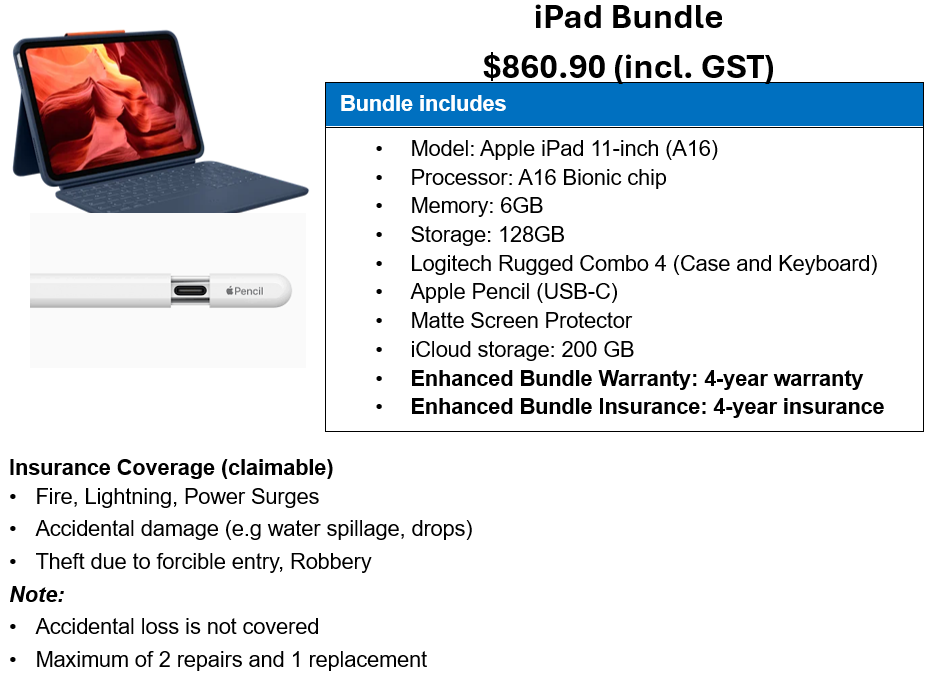
Option 1: MOE iPad Bundle (recommended)
The school has made arrangements for parents to purchase the PLD from AsiaPac Distribution Pte. Ltd., the MOE-appointed vendor.
Funding Support for Singapore Citizen (SC) Students
• Payment can be made using your child’s/ward’s Edusave account, after setting aside provision for payment of miscellaneous fees.
• To ensure the affordability of devices, MOE has provided Edusave top-ups from 2020 to 2023 and in 2025 to all eligible Singapore Citizen students.
• Most SC students will have sufficient Edusave funds.
• If Edusave funds are insufficient, please ensure sufficient funds in your GIRO-linked bank account for deduction on 13 Feb 2026.
Financial Assistance Scheme (FAS)
For Singapore Citizen (SC) Students
• MOE FAS: $0 out-of-pocket. Subsidies are automatically provided.
• School-based FAS: Up to $50 out-of-pocket after subsidies.
• Subsides are not applicable for non-FAS SC students, whose Gross Monthly Household income (GMH) exceeds $5,500 or Per Capita Income (PCI) exceeds $1,375. Parents/Guardians can use their child’s/ward’s Edusave or cash to defray the device bundle cost.
For Non-SC Students
• Permanent Residents and International students may approach the school for assistance if GMH is below $5,500 or PCI is below $1,375.
Option 2: Bring existing iPad for DMA Installation
Parents/Guardians who do not opt for the MOE iPad bundle must ensure that the existing iPad meet all the following requirements:
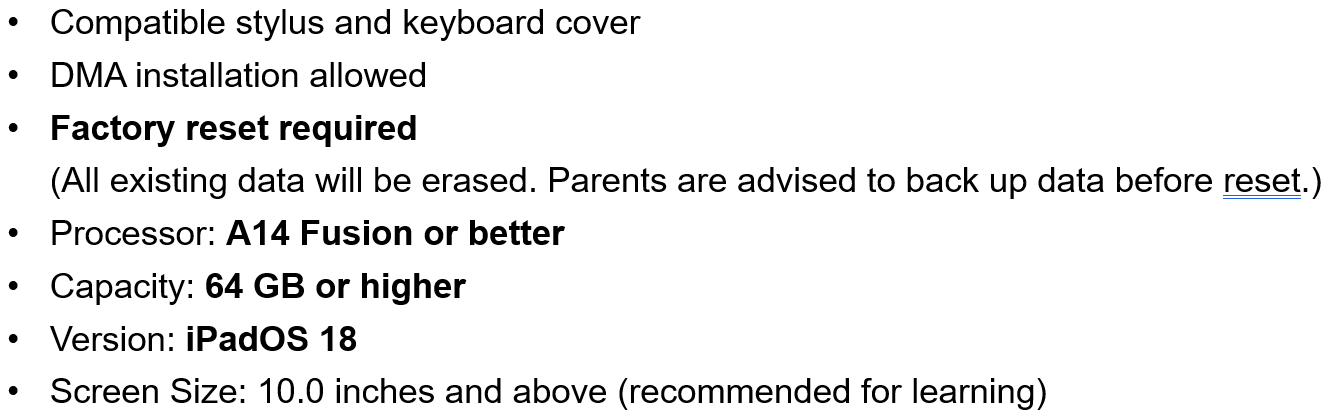
(please click here to check supported iPad models)
A separate PG notification will be sent to inform parents of the date their child should bring the device to school for suitability checks and DMA installation.
Timeline for Parents/Guardians
• 7 Jan 2026 (Wed): Parental Consent for the Purchase of PLD sent via a Parent Gateway
• 9 Jan 2026 (Fri): Parents’ Engagement Session during Sec 1 MTP
• By 14 Jan 2026 (Wed):
• Submit Consent for the Purchase of PLD via Parent Gateway
• Submit Standing Order (SO) for the use of Edusave via https://go.gov.sg/edusaveformsgso (Applicable to Singapore Citizen students only)
• By 6 March (subject to change): Student collection of devices and DMA installation
Device Management Application (DMA)
All student PLDs will be installed with the MOE Device Management Application (DMA), funded by MOE, to safeguard students' cyber wellness and support focused learning. The DMA will be removed when the student graduates or leaves the school.
DMA Operating Hours
• School Hours: 6.30 a.m. to 4.30 p.m.
• After-School Hours: 4.30 p.m to 10.30 p.m (device sleeps thereafter)
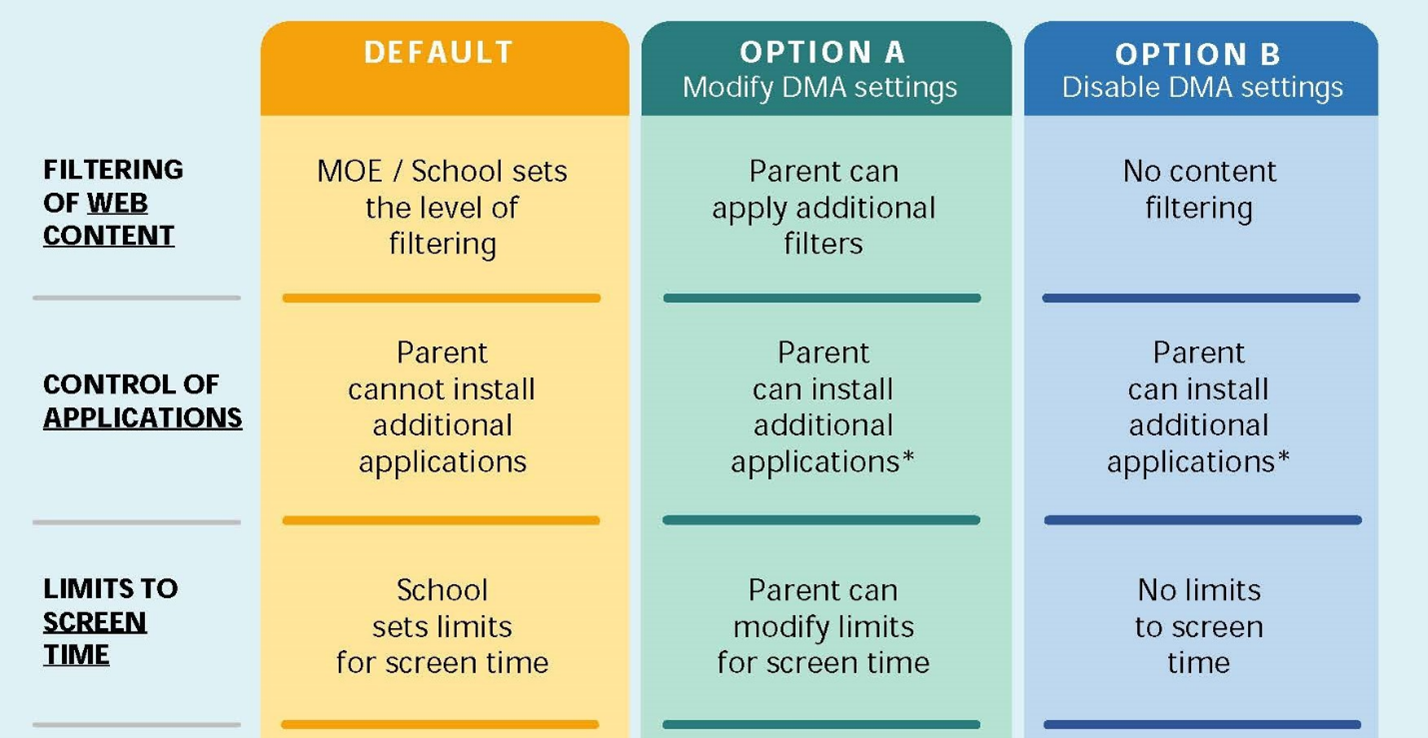
By default, the settings remain active after school hours. Parents are recommended to continue with the Default settings for after-school hours, especially for parents who prefer not to manage device settings on their own. Parents may choose alternative after-school settings (Option A or B).
Summary of DMA settings during school hours and after-school hours
Important Notes on DMA
• Parents will receive a notification to indicate their DMA preference when students receive their PLDs.
• The Default DMA setting is recommended
• Parents who select Option A may adjust filters and limit screen time during after-school hours using the Jamf Parent App.
• Requests to change after-school DMA options should be emailed to ict@preshigh.edu.sg. Only requests made by parents/guardians will be accepted.
(Please note that changes will only take effect from the start of the next school term)
DMA User Guides
Parents may refer to the following guides to navigate through the features in each DMA option.
|
Default |
Option A (with Jamf Parent App) |
Option B |
For more information on the PLD Initiative, please refer to the Parent’s Engagement Deck.